【Haskell 语言】基础概念与语法
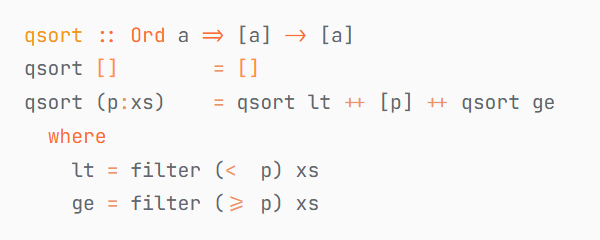
封面图为 Haskell 实现的快速排序算法,使用字体 JetBrains Mono.
前置知识
- 一般的编程基础
- 无类型 λ 演算
参考的是 https://www.bilibili.com/video/BV1pwdgYmE9L
环境配置
如果读者不想配置,可使用 https://play.haskell.org/ 的在线运行,但它不提供交互式。
参考 https://www.haskell.org/downloads/ 的指引
在 Windows 下,可使用以下 Powershell 命令
Set-ExecutionPolicy Bypass -Scope Process -Force;[System.Net.ServicePointManager]::SecurityProtocol = [System.Net.ServicePointManager]::SecurityProtocol -bor 3072; try catch
安装完毕后,运行命令 ghci 就可打开交互式窗口。
可以在 VSCode 中安装 Haskell 插件,它可以提供简化函数定义的功能。
类型
值
Haskell 是一个强类型语言,每一个值都有类型。但我们无法去对类型本身进行操作,因此不讨论类型的类型。
GHCi 中可以用 :type 或其简写 :t 命令查看一个值的类型。
ghci> :t 0
0 :: Num a => a
ghci> :t 0::Integer
0::Integer :: Integer
ghci> :t 0::Int
0::Int :: Int
类型有时也会产生一些需要处理的问题:
ghci> b::Int = 3
ghci> 2 / 3
0.6666666666666666
ghci> 2 / b
<interactive>:3:3: error: [GHC-39999]
? No
? In the expression: 2 / b
In an equation for ‘it’: it = 2 / b
ghci> 2 / fromIntegral b
0.6666666666666666
函数
类似于无类型 λ 演算中的定义,Haskell 中的函数“只接受一个参数”。
例如
ghci> :t isUpper
ghci> isUpper 'A'
True
ghci> isUpper ' '
False
ghci> isUpper "abc"
<interactive>:5:9: error: [GHC-83865]
? Couldn't match type ‘[Char]’ with ‘Char’
Expected: Char
Actual: String
? In the first argument of ‘isUpper’, namely ‘"abc"’
In the expression: isUpper "abc"
In an equation for ‘it’: it = isUpper "abc"
这个函数接受一个 Char 类型参数,返回一个 Bool 类型的值。
Haskell 中实际上存在元组,对应的泛性质是积。
用括号表示元组
ghci> (fst (1, 2), snd (3, 4))
(1,4)
可以使用元组作为函数的参数。注意这里使用了模式匹配(否则就要写 addInt tup = fst tup + snd tup)。
ghci> addInt (a, b) = a + b
ghci> addInt (101, 103)
204
但这不是正确的 Haskell 的函数使用方式。我们应当使用 Curry 化:
addInt a b = a + b
我们可以正常使用它或用它生成填充了部分参数的函数:
ghci> addInt 3 4
7
ghci> incr = addInt 1
ghci> :t incr
ghci> incr 10
11
ghci> (incr . incr) 10
12
列表
构造
ghci> 0 : [1,2,3] ++ [4,5]
[0,1,2,3,4,5]
ghci> [1..10]
[1,2,3,4,5,6,7,8,9,10]
ghci> ['A'..'Z']
"ABCDEFGHIJKLMNOPQRSTUVWXYZ"
[1..] 将生成一个无限列表。
得益于 Haskell 是懒惰求值的,我们可以取出它的前若干项。
ghci> [1..] -- 不断输出;使用 Ctrl + C 打断
[1,2,3,4,5,6,7,8,9,Interrupted.
ghci> last [1..] -- 无法停止;使用 Ctrl + C 打断
Interrupted.
ghci> :t [1..]
[1..] :: (Num a, Enum a) => [a]
ghci> take 10 ([2, 3, 7] ++ [1..])
[2,3,7,1,2,3,4,5,6,7]
列表推导式
这是一种语法糖。在竖杠左侧为值,右边为符合的条件。这类似于集合的一种表达方式。
ghci> map (+1) [1..10]
[2,3,4,5,6,7,8,9,10,11]
ghci> map' f xs = [ f n | n <- xs ]
ghci> map' (+1) [1..10]
[2,3,4,5,6,7,8,9,10,11]
ghci> filter' p xs = [ n | n <- xs, p n ]
ghci> filter' even [1..10]
[2,4,6,8,10]
实际上使用起来相当自由:
ghci> [ e | li <- ["Ahh!", "meow~", "..."], e <- li ]
"Ahh!meow~..."
应用
String 其实就是 [Char] 的别名。
考虑以下代码(在位于 ./Main.hs 的文件中编辑)
unused = undefined -- canonical
canonical = filter (/= ' ') . map normalise
normalise c | isUpper c = c
| isLower c = toUpper c
| otherwise = ' '
并使用 :load Main 运行,这会得到
ghci> :load Main
[1 of 2] Compiling Main ( Main.hs, interpreted )
Ok, one 或者,也可以使用 GHCi 提供的多行输入(从 :{ 开始,以 :} 结束)
我们来测试以下:
ghci> canonical "Hello, world!"
"HELLOWORLD"
ghci> f = group . sort . canonical
ghci> f "Hello, world!"
["D","E","H","LLL","OO","R","W"]
用反斜杠 \ 声明 Lambda 表达式。
ghci> display = map (\x -> (head x, length x))
ghci> unused = display . group . sort . canonical
ghci> unused "Hello, world!"
[('D',1),('E',1),('H',1),('L',3),('O',2),('R',1),('W',1)]
自定义类型
新类型
我们可以定义类型别名,或基于原类型定义新类型
ghci> type Id = Int
ghci> newtype Id = Id Int
也可以从头开始定义类型
ghci> data Lis = Empty | Cons Int (Lis)
ghci> :t Empty
Empty :: Lis
ghci> :t Cons 1 (Cons 2 Empty)
Cons 1 (Cons 2 Empty) :: Lis
可以增加泛型
ghci> data Lis ty = Empty | Cons ty (Lis ty)
ghci> :t Cons 1 (Cons 2 Empty)
Cons 1 (Cons 2 Empty) :: Num ty => Lis ty
ghci> :t Cons 'A' (Cons 'B' Empty)
Cons 'A' (Cons 'B' Empty) :: Lis Char
在文件中写如下内容
data Lis ty = Empty | Cons ty (Lis ty)
toHList Empty = []
toHList (Cons x xs) = x : toHList xs
即有 toHList (Cons 'a' (Cons 'b' Empty)) 给出 "ab"
或可使用语法糖 toHList $ Cons 'a' $ Cons 'b' Empty
也可以实现我们在现代语言中熟悉的 Option(在 Haskell 里对应的类型是 data Maybe a = Nothing | Just a)
data Option a = None | Some a
safeDiv a 0 = None
safeDiv a b = Some (a `div` b)
对于结构体,有更简单的定义方法
data Person = Person {
}
你会得到:
ghci> a = Person "Alice" 20 (1901, 1, 1)
ghci> a
Person {name = "Alice", id = 20, dob = (1901,1,1)}
ghci> name a
"Alice"
类型类
我们之前用到了 show,可以将数据变为显示的字符串
ghci> show 'A'
"'A'"
ghci> (putStrLn . show) [1, 2, 3]
[1,2,3]
我们可以通过 class 和 instance 自己实现。例如:
data List a = Empty | Cons a (List a)
display x = show x
display (Empty) = "[]"
display (Cons a xs) = "[" ++ display a ++ ", " ++ display xs ++ "]"
display (Cons (1::Int) (Cons (2::Int) Empty)) 会得到 "[1, [2, []]]"
deriving 的方式也可以允许自动推导出 Eq、Ord 等
有时,我们不接受默认的推导方式,可自行定义
data Q = Q Integer Integer
show (Q a b) = concat [show a, "/", show b]
simp (Q a b) = Q (a `div` c) (b `div` c)
where c = gcd a b
r1 == r2 = (a1 == a2) && (b1 == b2)
where (Q a1 b1) = simp r1
(Q a2 b2) = simp r2
addQ (Q a1 b1) (Q a2 b2) = simp $ Q (c1 + c2) m
where m = lcm b1 b2
c1 = a1 * (m `div` b1)
c2 = a2 * (m `div` b2)
mulQ (Q a1 b1) (Q a2 b2) = simp $ Q (a1 * a2) (b1 * b2)
(+) = addQ
negate (Q a b) = Q (-a) b
(*) = mulQ
abs (Q a b) = Q (abs a) (abs b)
signum (Q a b) = Q (signum a * signum b) 1
fromInteger n = Q n 1
我们希望你的 Eq 等类型类的实现满足对应的语义,尽管编译器无法检查。
例如 Eq 要求满足自反性、对称性、传递性。
上例中,我们将得到:
ghci> Q (-1) 10 + Q 1 2
2/5
高阶函数
高阶函数是指参数或返回值中有类型是函数的函数。
一个典型的简单例子是 flip
ghci> :t flip
ghci> flip (\x y -> x) 'x' 'y'
'y'
ghci> (+++) = flip $ foldr (:)
ghci> "Hello, " +++ "world!"
"Hello, world!"
map 是常用的函数
ghci> map (\x -> [x, 2*x]) [1..3]
[[1,2],[2,4],[3,6]]
ghci> concatMap (\x -> [x, 2*x]) [1..3]
[1,2,2,4,3,6]
折叠
foldl 与 foldr 是有趣的函数。
ghci> :t foldr
ghci> :t (:)
(:) :: a -> [a] -> [a]
ghci> :t []
[] :: [a]
ghci> 1 : 2 : 3 : []
[1,2,3]
ghci> 1 + 2 + 3 + 0
6
ghci> foldr (:) [] [1..10]
[1,2,3,4,5,6,7,8,9,10]
ghci> foldr (+) 0 [1..10]
55
ghci> foldr (*) 1 [1..10]
3628800
对 [] 类型,典型的定义方式为:
foldr _ v [] = v
foldr f v (x:xs) = x `f` (foldr f v xs)